Selling wholesale from the Shopify store you already run comes down to a few decisions: who counts as a wholesale buyer, what they pay, what a wholesale order must look like, what everyone else sees, and how businesses pay. Get those right and retail and wholesale customers shop the same catalog, each at their own price.
This guide goes through each decision, the options Shopify gives you today, and how to set each one up step by step with Easy Wholesale, the wholesale app we build at DevCloud (see it on the Shopify App Store). Since it is our app, we are explicit about what it does and what it does not do.
What a wholesale setup needs
Whatever tool you use, a wholesale program has the same parts. Decide each one before you touch any settings:
- Groups and prices: one or more groups of business buyers (say "Wholesale" and a better-priced "Gold" tier), each with a percentage off, an amount off or a fixed price, plus quantity breaks for bigger orders.
- Approval: a registration form where businesses apply, and a place where you check them first.
- Order rules: a minimum order amount, a minimum or maximum number of units, or case sizes.
- Visibility: whether retail visitors see prices at all, and which products are wholesale only.
- Payment: a method, such as an invoice, that only approved buyers can choose.
Your options: Shopify's native B2B or an app
You no longer need Shopify Plus to sell wholesale. In April 2026 Shopify announced that its B2B features were rolling out beyond Plus, and its Help Center now lists Shopify B2B on the Basic, Grow, Advanced and Plus plans (not on Starter or Retail). Native B2B is built around companies: each business is set up as a company with locations and gets catalogs with their own prices. On Basic, Grow and Advanced it includes quantity rules, volume pricing and net payment terms, with up to three active catalog assignments; Plus removes that limit and adds deposits and partial payments. Details are on Shopify's B2B features by plan page.
Also read its B2B requirements and considerations: among them, the store must use the new customer accounts, some features (accelerated checkouts such as Shop Pay) are not available on B2B orders, and B2B orders have their own platform fee rates.
The other route is an app that treats wholesale as a customer tag. Business buyers stay ordinary Shopify customers; a tag such as wholesale puts them in a group, and the group's prices and rules apply in your regular checkout. It suits stores that would rather tag buyers than set them up as companies. That is how Easy Wholesale works, and what the steps below show.
Here is the app's overview video before the step-by-step:
Step 1: Create a customer group and set wholesale prices
In Easy Wholesale, open Groups and create your first group: a name, such as "Wholesale", and a customer tag, such as wholesale. Every customer with that tag in Shopify gets the group's prices, whether the tag came from an approval in the app or you typed it on the customer yourself.
Then open Pricing rules and choose Add pricing rule:
- Customers: pick the group.
- Products: all products, or specific collections, products or variants. A rule on a collection also covers products you add to it later.
- Price: a percentage off, an amount off per unit, or a fixed price per unit. A rule never raises a price.
- Quantity breaks (optional): for example 30% off from 12 units and 35% from 48, counted per cart line or per product (all its variants together).
Rules never stack: when several match a product, the highest priority wins, and on a tie the lower price. Before you save, the Price preview shows what a group pays for any product and quantity, worked out the same way checkout does.
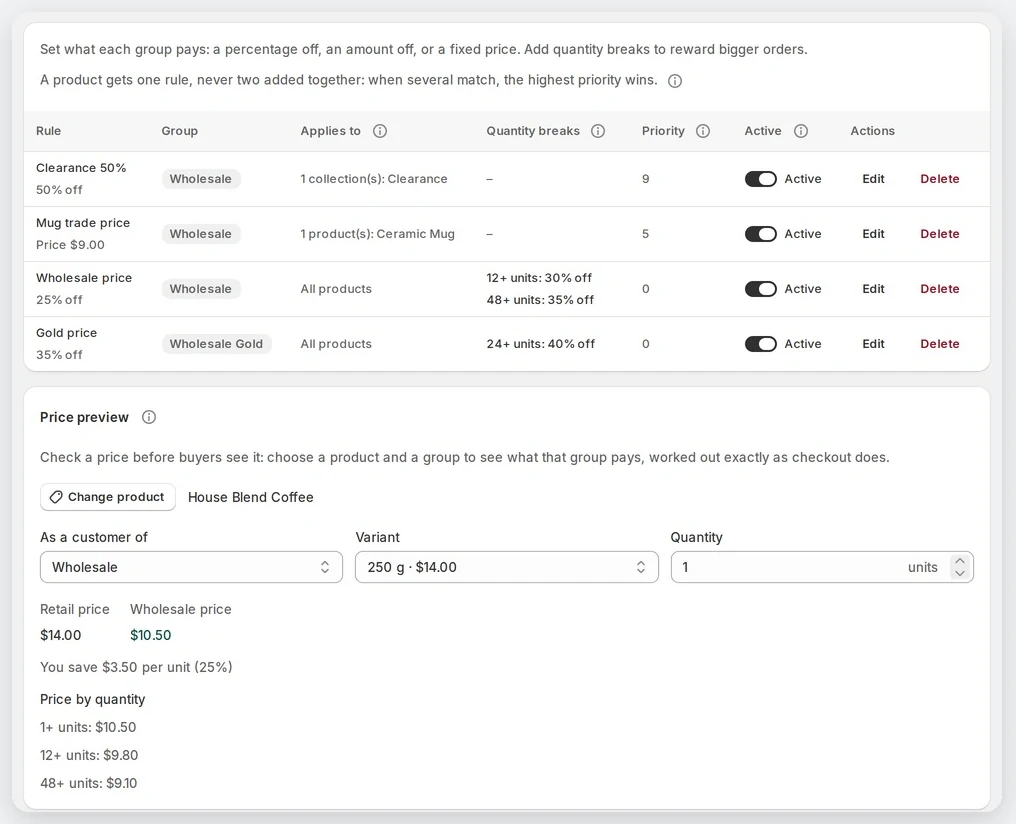
Last, show the prices on your store: in the theme editor, open App embeds, switch on Easy Wholesale and save. Logged-in wholesale buyers then see their price next to the struck-through retail price (an optional Wholesale price block adds a panel with the quantity breaks). Without the embed, checkout still charges the wholesale price, but product pages show the retail one.
Plans: the Free plan includes one group and three pricing rules; quantity breaks and unlimited groups and rules are in Growth.
Step 2: Let businesses apply, and approve them
Your store gets a ready-made registration page at /apps/easy-wholesale/register, styled by your theme. Link to it from your menu, or add the Wholesale registration block to one of your own pages in the theme editor. Email, first name and last name are always asked; under Storefront → Registration form you can add company, phone, tax ID and message, plus up to ten questions of your own (short text, paragraph, dropdown or checkbox) on the ready-made page.
Each applicant is added to your Shopify customers as soon as they apply, tagged wholesale-applicant. You review applications in Registrations, one at a time or several at once. Approving swaps the applicant tag for the group's tag, which gives them its prices; rejecting tags them wholesale-rejected and sends no email.
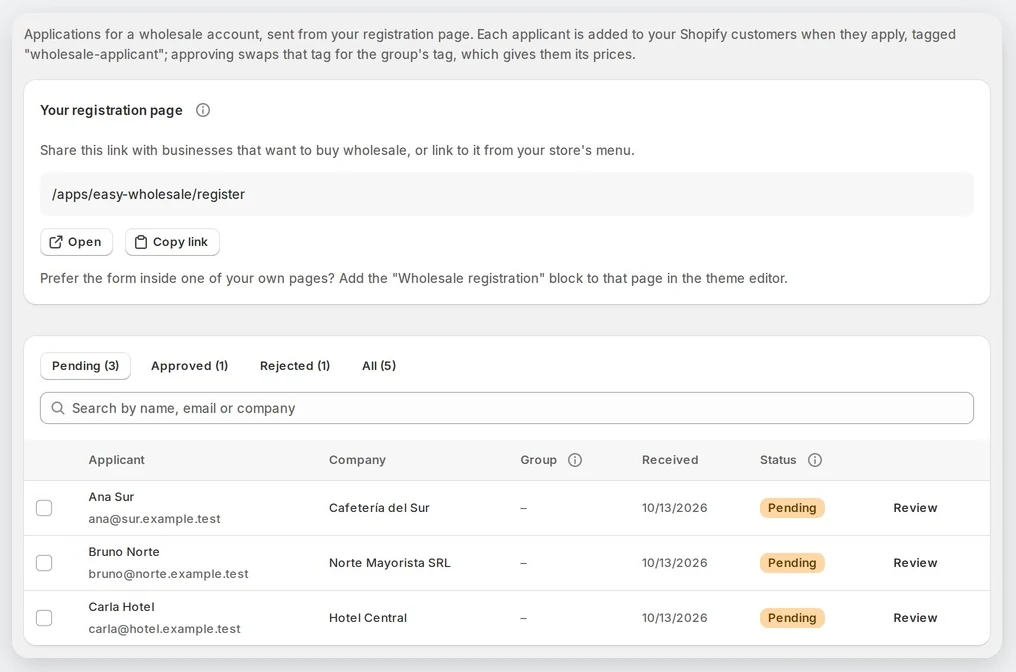
Options include an email to you for each application, a welcome email on approval, automatic approval for a group, an EU VAT number check with VIES, and (on Pro) tax exemption. Buyers you already know can be added by email on the Customers page.
Plans: registration with approval is in every plan, Free included (up to 25 wholesale customers on Free).
Step 3: Set order minimums and case sizes
In Order rules, choose Add order rule, pick a group and the products that count, and fill in one or more requirements:
- Minimum order amount: the subtotal of those products, after the wholesale discount.
- Minimum or maximum units: all those products added together across the order.
- Order in multiples of: case sizes, checked on each product line (6 allows 6, 12, 18…).
Only logged-in customers in the rule's group are checked; retail customers and guests never see these rules. At checkout, a wholesale buyer whose cart doesn't meet the rule sees your message and can't pay until it does.
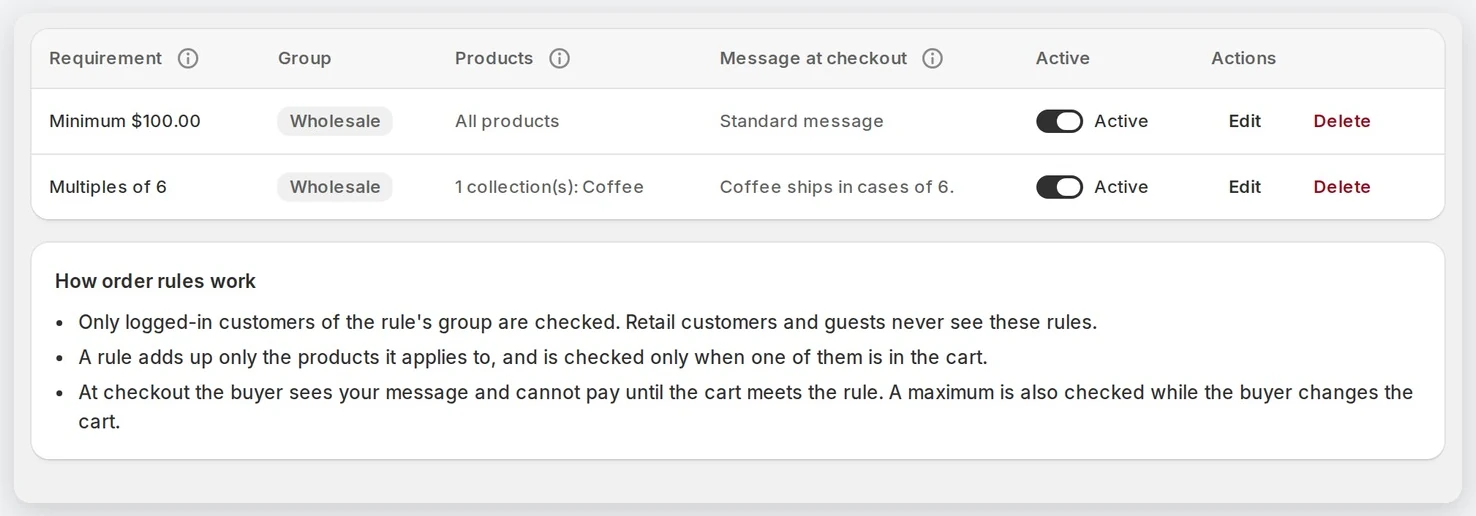
A practical tip: write your own checkout message. The standard message gives the minimum as a plain number, without a currency symbol, so a message such as "Wholesale orders start at $250" reads better.
Plans: order rules are in Growth and Pro.
Step 4: Hide prices or products from retail visitors
Under Restrictions you decide what everyone else sees:
- Hide prices: from everybody who is not a wholesale customer, or only from visitors who are not logged in. Instead of the price they see a prompt to log in, or your own message, plus a link to apply for a wholesale account. Where a price is hidden, the Add to cart and Buy now buttons are hidden too.
- Wholesale-only products: choose products or collections that only one group can buy. Anyone else who adds them sees your message at checkout and can't pay until they remove them.
- Locked pages (optional): visitors outside the group who open a locked product or collection page are sent to your registration page, or to another page you choose.
Good to know: wholesale-only products still appear in collection grids (locking a collection locks its page; its product pages stay open but can't be bought), and search engines still see locked pages. Hidden prices cover your theme's prices, so check any other app's price widget too.
Plans: hidden prices and wholesale-only products are in Growth and Pro.
Step 5: Offer an invoice option only to approved buyers
First create a manual payment method in Shopify under Settings → Payments → Manual payment methods, for example "Pay by invoice". Then, in Easy Wholesale's Payment rules, add a rule for your Wholesale group and enter that name under Show these only to the group. Wholesale buyers see the method at checkout; nobody else does. You can also hide methods, such as cash on delivery, from a group or from customers in no group.
Two limits to know:
- Payment rules work for manual methods, wallets and local methods. In the United States and Canada, Shopify limits payment customizations to methods other than credit cards unless the store is on Plus (Shopify Help Center), so card payments stay visible there.
- The invoice is a manual payment method: the order arrives unpaid, and you invoice and collect yourself. The app sets no due date and sends no reminders; net terms managed by Shopify are part of its native B2B, for orders placed by companies.
Plans: payment rules are in Pro, together with tax exemption for approved customers and CSV import and export of pricing rules.
A quick order form for repeat buyers
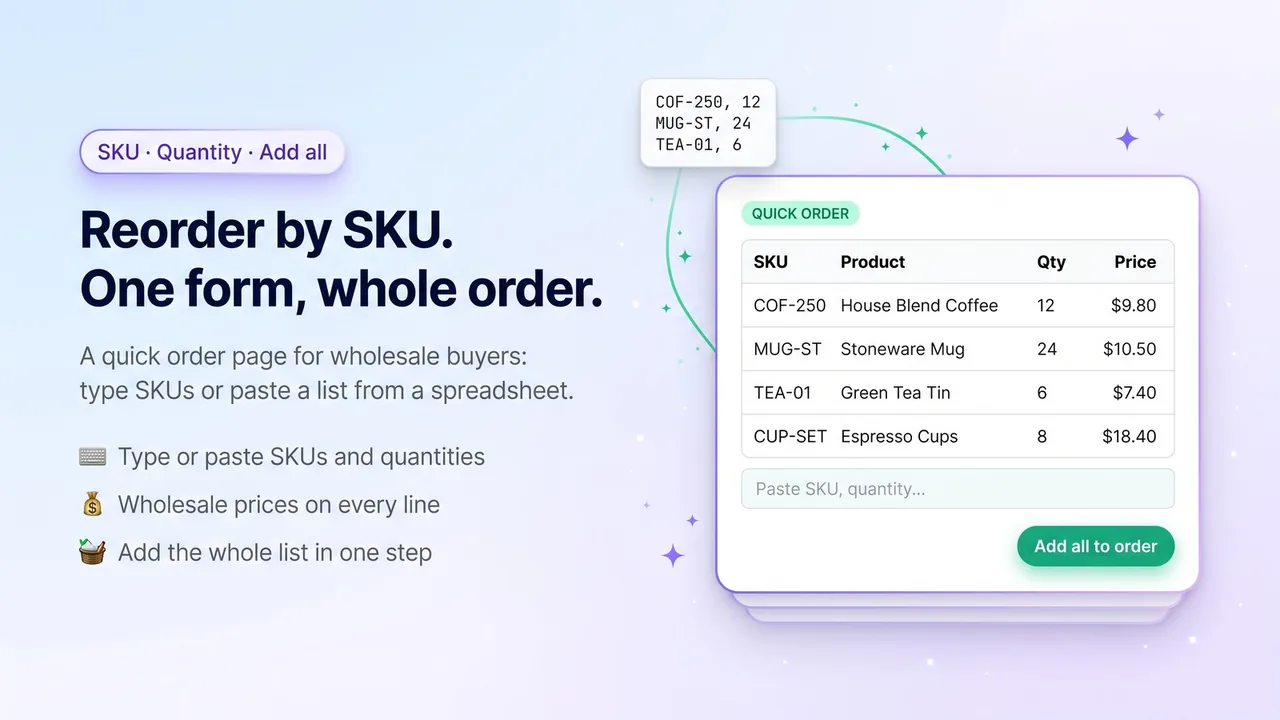
Businesses often reorder the same items. Easy Wholesale's quick order page (/apps/easy-wholesale/order, or the Quick order form block on any page) lets a logged-in buyer type SKUs and quantities, or paste lines such as COF-250, 12 from a spreadsheet, see their wholesale price on each line, and add everything to the cart in one step. Visitors who aren't logged in see a prompt to log in instead. It is included in Growth and Pro.
Before you go live: a short checklist
- Test as a wholesale buyer. The app's Home page can create a "Wholesale (example)" group with 20% off everything and you as its customer. Log in to your store and add a product to the cart; delete the group when you're done.
- Test as a guest and as a retail customer to confirm what they see: prices, locked pages and payment methods.
- Try a cart just under your minimum, and one that isn't in case sizes, to read your messages at checkout.
- Selling in several currencies? For now the product page shows the wholesale price only in your store's currency. In other currencies the page shows the retail price, and checkout still applies the wholesale discount.
Plans and pricing
- Free: one customer group, three pricing rules, up to 25 wholesale customers, and registration with approval.
- Growth, $19/month: unlimited groups, rules and customers, quantity breaks, order minimums, maximums and case sizes, wholesale-only products and hidden prices, and the quick order form.
- Pro, $39/month: everything in Growth, plus payment method rules, tax exemption for approved customers, CSV import and export of rules, and priority support.
Growth and Pro have a 14-day free trial, and Shopify bills the plan on your store's invoice. The Free plan is enough to try the whole flow with one group: a business applies, you approve it, and it pays its price at checkout. You can install it from the Easy Wholesale page on the Shopify App Store.